

Guides
Free A0 Research Poster Template (PowerPoint)

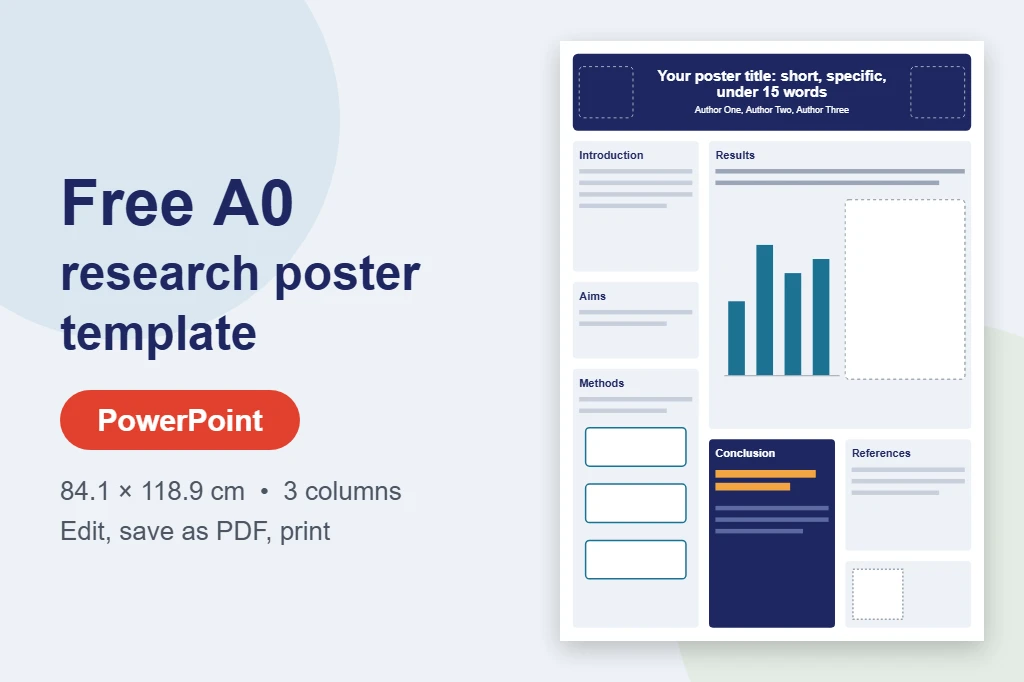
Quick answer: Download our free A0 research poster template for PowerPoint below. It is set to the exact A0 portrait size (84.1 × 118.9 cm) with a 3-column layout, ready-made sections and readable font sizes. Replace the text, add your charts and images, save it as a PDF and send it for printing.
Starting from a blank slide is the slowest way to make a poster. This template gives you a clean, tested layout so you can focus on your content. It is free, needs no sign-up, and works in PowerPoint on Windows and Mac.
Download the free A0 research poster template
Download the A0 template (.pptx, 21 KB)
Free to use for your own research posters. No email or account needed.
What is included in the template
- Exact A0 portrait size: 84.1 × 118.9 cm, so text and images print at the size you see on screen.
- A 3-column layout: title band with two logo spaces, then introduction, aims and methods on the left, a large results area across the middle and right, and conclusion, references and a QR code box at the bottom.
- Readable font sizes already set: title about 90pt, headings 48pt, body text 28pt and references 22pt, in Arial.
- Word guides in every box: for example, introduction 50–100 words and conclusion 50–100 words, so the poster stays within 300 to 800 words.
- An editable chart: a native PowerPoint bar chart you can update with your own data.
- A simple methods flow diagram and placeholders for a second figure, your logos and a QR code.
For more detail on what goes in each section, read our guide on what to include on a research poster.
How to use the template in PowerPoint
- Open the file in PowerPoint. The poster is a single slide.
- Replace the title, authors and affiliations in the dark band at the top, and add your logos in the two dashed boxes.
- Replace the text in each box with your own. Keep body text at 28pt or larger and cut words rather than shrinking the font.
- Update the chart: right-click it and choose Edit Data, or delete it and paste your own chart.
- Add images and figures with Insert > Pictures, using the original, high-resolution files rather than screenshots.
- Add your QR code (8–10 cm wide on A0) and delete the small template credit line at the bottom.
- Save as a PDF: on Windows use File > Export > Create PDF/XPS; on a Mac use File > Save As and choose PDF. Check the PDF is one page at 84.1 × 118.9 cm.
Our guide to printing a PowerPoint poster at A0 covers export settings and common problems in more detail.
Using the template in Google Slides, Keynote or at A1
- Google Slides: upload the .pptx to Google Drive and open it with Google Slides. Check File > Page setup still shows 84.1 × 118.9 cm. See how to make an A0 poster in Google Slides.
- Keynote: Keynote can open .pptx files. Check the slide size and fonts before you export.
- A1 instead of A0: in PowerPoint go to Design > Slide Size > Custom Slide Size, enter 59.4 × 84.1 cm and choose Ensure Fit. Text scales to about 71%, so 28pt body text becomes about 20pt, which is still readable on A1. See A0 vs A1 conference posters.
- Landscape: if your conference asks for landscape, set a custom size of 118.9 × 84.1 cm before adding content and rearrange the boxes into 4 columns. Check your event’s rules in our UK conference poster sizes guide.
Before you print
- Print the poster on A4 and hold it about 50 cm away. If you can read the body text easily, it will be readable on A0. Our academic poster font size guide explains why.
- Zoom in to 200% on every image. If it looks blurry on screen, it will look blurry on paper.
- Delete any boxes you did not use, and the template credit line.
- Run through our academic poster checklist before you upload.
Ready to print your poster?
Upload your PDF to our A0 poster printing page. A0 posters start at £34.99 and A1 at £29.99, printed on 260gsm matte or satin paper and rolled in a protective tube. Delivery is free across the UK, orders placed before 12PM (Monday to Friday) are printed the same day, and next-day delivery is available if your conference is close.
Frequently asked questions
Is the A0 research poster template really free?
Yes. You can download and use it for your own research posters with no email, account or payment.
What size is the template?
It is set to A0 portrait, 84.1 × 118.9 cm (about 33.1 × 46.8 inches), the size most often used at UK conferences.
Can I use the template in Google Slides?
Yes. Upload the .pptx to Google Drive and open it with Google Slides, then check File > Page setup still shows 84.1 × 118.9 cm before you edit.
Can I change the template to A1?
Yes. In PowerPoint use Design > Slide Size > Custom Slide Size, enter 59.4 × 84.1 cm and choose Ensure Fit. The 28pt body text becomes about 20pt, which still suits A1.
What file should I send for printing?
Send a PDF exported at the full poster size. A PDF keeps text sharp and fonts in place, so it prints exactly as it looks on screen.
